A narrow upper-mid resonance turns presence into pain.
MODULE 01 / VOCAL RESTORATION
RESCUE
VOCAL RESONANCE SUPPRESSION
Can RESCUE
save this vocal?
When the room, microphone, or recording leaves a vocal harsh, boxy, or trapped in a can, RESCUE finds the resonances fighting the performance—and gives you the controls to push back.
RESCUE / CURRENT DEVELOPMENT BUILD SYSTEM IN DEVELOPMENT
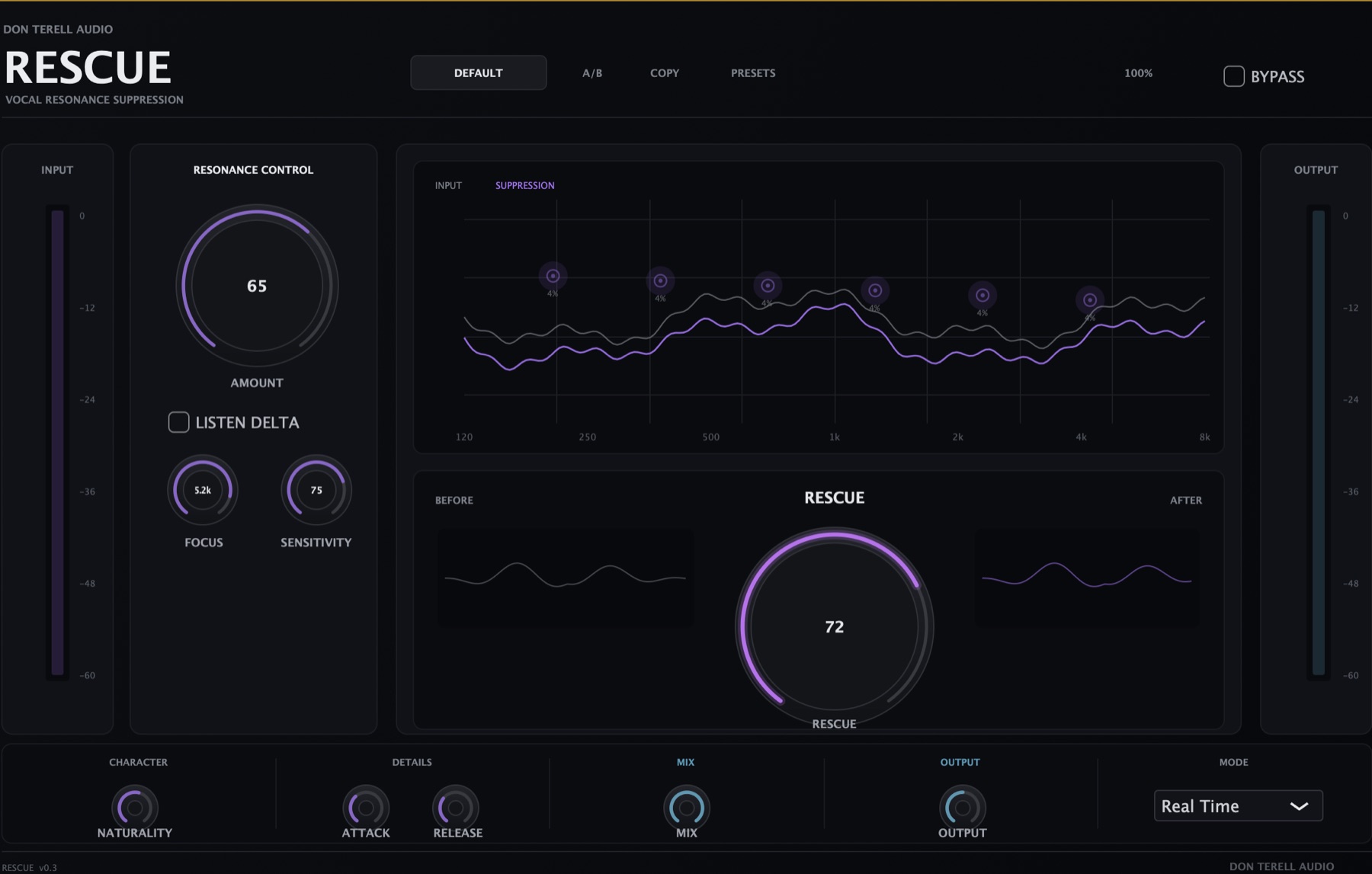
Current development interface shown. Product appearance and implementation may continue to evolve before release.
THE PROBLEM
THE TAKE IS RIGHT.
THE RECORDING ISN’T.
Room and microphone buildup makes the vocal feel closed-in.
Multiple resonances flatten the sense of space and realism.
Dynamic control follows the problem instead of permanently carving the life out of the vocal.
MONITOR THE DECISION
BEFORE → RESCUE
→ DELTA → AFTER
See the untreated signal and its moving spectral energy.
Six editable nodes track and suppress selected resonance zones.
Solo the removed content and protect the parts of the performance that belong.
Compare output behavior and level against the original recording.
ENGINEER CONTROL
INTELLIGENCE
YOU CAN EDIT.
Six editable filter nodes
Target the resonances RESCUE finds, then shape the frequency, width, and response with direct visual control.
Real-time spectral analysis
Watch problem energy move through the spectrum instead of making decisions from a frozen snapshot.
Aggressive when necessary
A broad suppression range is available for vocals that need more than a polite correction.
Delta monitoring
Hear the material being removed so you can distinguish cleanup from damage.
External sidechain
Guide detection from an external signal when the session calls for a more deliberate relationship.
Two processing modes
Work quickly in Real Time, then move to High Quality when the final result matters most.
INITIAL RELEASE TARGET
SYSTEM
REQUIREMENTS
RESCUE is still in development. Final compatibility details will be confirmed before the trial and purchase paths open.
- PLATFORM
- macOS first
- FORMATS
- Audio Units + VST3
- HOST
- Compatible 64-bit AU or VST3 host
- PROCESSING
- Real Time / High Quality
- SIDECHAIN
- External sidechain supported
SYSTEM NOTES
FAQ
01What is RESCUE designed to fix?+
RESCUE is built for vocal resonances that read as harsh, boxy, canned, or room-compromised—especially recordings made in untreated spaces or with inexpensive microphones.
02Does RESCUE replace EQ?+
No. It is a dynamic, frequency-selective problem-solving tool. Traditional EQ, compression, and intentional tone shaping still have their place in the chain.
03Can I hear only what RESCUE removes?+
Yes. Delta monitoring is part of the current product design so you can audition the suppressed material directly.
04Which formats are planned first?+
The first release target is Audio Units and VST3 on macOS. Additional platforms or formats have not been announced.
05Is RESCUE available to buy now?+
Not yet. RESCUE remains in active development. The launch list is the current path for release updates and trial or purchase availability.
RESCUE / PRE-RELEASE
THE VOCAL
IS WORTH SAVING.
Trial and purchase are not open yet. Join the Don Terell list for release updates and first-access information.
Join the launch listBETA TESTER ACCESS
RESCUE beta
macOS AU and VST3 builds. Enter your tester code to download the ZIP. Read the included instructions before installing.
Installation instructions
- Unzip the download on your Mac.
- Read the included README and release notes.
- Copy the .component file into
~/Library/Audio/Plug-Ins/Components/for Audio Units, and the .vst3 file into~/Library/Audio/Plug-Ins/VST3/for VST3. - Restart your DAW and scan for RESCUE. If macOS blocks the unsigned beta, contact Don for the current approved installation steps.